
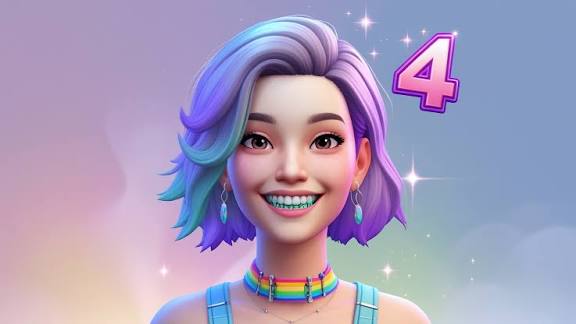
The world of The Sims 4 has always been a playground for creativity. From designing elaborate homes to crafting complex character stories, players can shape nearly every aspect of a Sim’s life. One of the most exciting recent trends in the community is the use of custom content (CC) and mods, which allows players to push the boundaries of what’s possible in the game. Among these, the Colorful Braces MagicBot has emerged as a fan-favorite, adding a playful and unique twist to Sims’ dental aesthetics.
In this article, we will explore what Colorful Braces MagicBot is, how it works, why it has become so popular, and how you can use it to give your Sims a personalized, vibrant smile.
What Is Colorful Braces MagicBot?
Colorful Braces MagicBot is a custom content mod for The Sims 4 that allows Sims to wear braces in a variety of bright and fun colors. Unlike the game’s default braces option, which is limited and often bland, this mod lets players select from a wide palette of colors, patterns, and even combinations, making dental fashion a creative extension of a Sim’s personality.
The mod is part of a growing community of aesthetic-enhancing CCs, which aim to make character customization more expressive. With Colorful Braces MagicBot, the simple act of smiling can become a statement, whether your Sim is a trendy teenager, a quirky adult, or even a magical character in a story-driven gameplay scenario.
How to Install Colorful Braces MagicBot
Installing Colorful Braces MagicBot is straightforward, especially if you’re familiar with other mods for The Sims 4. Here’s a step-by-step guide:
- Download the Mod: Locate the latest version of Colorful Braces MagicBot from a trusted The Sims 4 CC website. Always ensure the source is safe to avoid malware.
- Extract the Files: Most downloads come in a
.zipor.rarformat. Extract the files using a program like WinRAR or 7-Zip. - Move to Mods Folder: Copy the extracted
.packagefiles into your Sims 4Modsfolder, typically located at:Documents > Electronic Arts > The Sims 4 > Mods - Enable Mods in Game: Launch The Sims 4, go to Game Options > Other, and check Enable Custom Content and Mods and Script Mods Allowed. Restart the game.
- Access in CAS: Open Create-A-Sim (CAS), navigate to the teeth or accessories section, and you should see the colorful braces available for selection.
Once installed, you can mix and match colors, creating playful and eye-catching combinations that reflect your Sims’ individuality.
Features That Make Colorful Braces MagicBot Stand Out
Colorful Braces MagicBot is not just another cosmetic mod; it offers unique features that appeal to both casual players and serious storytellers:
1. Wide Color Palette
The mod offers dozens of vibrant colors, from neon pinks to deep blues, allowing for endless customization. Players can even create themed braces, such as rainbow braces for a fun festival look or alternating colors for quirky personalities.
2. Pattern Options
Some versions of the mod include patterns, such as stripes, polka dots, and even glitter effects. This adds another layer of creativity, making each set of braces truly unique.
3. Compatibility
Colorful Braces MagicBot is designed to be compatible with most other mods and CC. Whether your Sim is wearing custom lipsticks, hairstyles, or eye colors, the braces will integrate seamlessly without causing conflicts.
4. Age and Gender Flexibility
Unlike default options that may be limited by age or gender, this mod allows Sims of all ages and genders to sport colorful braces. This inclusivity opens up new storytelling possibilities.
5. Roleplay Enhancement
For players who enjoy storytelling or roleplay, braces can now become a character trait or plot device. Imagine a shy teen finally gaining confidence with a fun set of braces, or a young adult showcasing their quirky personality in a magical or fantastical story.
Why Players Love Colorful Braces MagicBot
The mod has become increasingly popular for several reasons:
1. Self-Expression
The Sims 4 has always been about self-expression, and braces—something often overlooked in the game—are now a vibrant canvas for personality. Players love that they can represent individuality through a smile.
2. Humor and Fun
There is a playful and humorous aspect to colorful braces. They are visually striking, making everyday interactions in the game more amusing. Watching Sims smile, laugh, or talk while sporting rainbow braces adds a lighthearted touch to gameplay.
3. Aesthetic Enhancement
For players focused on aesthetics or photography, Colorful Braces MagicBot can transform a Sim’s look in CAS and during gameplay. Social media sharing of Sims screenshots with colorful braces has become a trend in the community.
4. Inclusive Representation
The mod allows more accurate representation of real-life diversity, as braces are common among teens and young adults. Including them in a fun, stylish way increases relatability for players.
Tips for Using Colorful Braces MagicBot in Your Game
To make the most of this mod, consider these tips:
- Coordinate with Outfits: Choose braces colors that complement your Sim’s wardrobe. For example, bright braces go well with casual, colorful outfits, while subtle braces might suit formal wear.
- Match with Personality: Assign braces colors that reflect your Sim’s traits. A mischievous Sim could have bold, clashing colors, while a shy Sim might wear pastel shades.
- Photography: For players into Sims photography or social media sharing, braces can act as a focal point in portraits. Consider close-ups to highlight the smile.
- Mix with Other CC: Combine Colorful Braces MagicBot with custom hairstyles, earrings, or makeup for a fully personalized Sim.
- Story Integration: Use braces as part of your storytelling. For example, a storyline could feature a character who starts with traditional braces and gradually upgrades to colorful sets, symbolizing growth or confidence.
Common Questions About Colorful Braces MagicBot
Q: Will the mod conflict with other mods?
A: Most versions are designed to be compatible, but always read the creator’s instructions. Avoid outdated CC that may interfere with the mod.
Q: Can toddlers and elders wear braces?
A: Some versions support all age groups. Check the specific mod description before installing.
Q: Can I use multiple colors on one Sim?
A: Yes! The mod allows mixing and matching different colors for each tooth or row, depending on the mod version.
Q: Is it safe for game updates?
A: Typically, mods are safe, but after major updates, verify that the mod works to avoid glitches. Always back up your game first.
Conclusion
Colorful Braces MagicBot has transformed an overlooked aspect of The Sims 4 into an exciting canvas for creativity. By allowing players to add vibrant, personalized braces to their Sims, it enhances self-expression, storytelling, and the visual appeal of the game. Whether you are a casual player, an aesthetic enthusiast, or a dedicated storyteller, this mod opens up new possibilities for character design and gameplay fun.
With its ease of installation, wide range of colors, and compatibility with other mods, Colorful Braces MagicBot is more than just a cosmetic enhancement—it’s a playful invitation to make every Sim smile with style. So, if you want your Sims to stand out in the crowd, brighten their world with some colorful braces, and let their personalities shine through every toothy grin, this mod is the perfect addition to your game.
